Chat Everywhere

Changelog

Everything we have shipped, newest first.

Multi-File Meetings and a New Product Website

New Features

  • Meeting Summarizer — Multi-File Upload — Combine up to five ordered audio or video segments into one transcript, summary, mind map, and report.

Improvements

  • Chat Everywhere Website — The redesigned website puts education workflows and the Teacher Portal at the centre of product discovery.

YouTube Import, Message Board, and Quiz PDFs

New Features

  • Message Board — Students can review shared classroom messages and submit feedback, while teachers can track and open responses.
  • Meeting Summarizer — YouTube Import — Create transcripts and summaries by pasting a supported YouTube link.
  • In-Class Quiz — Incorrect-Question PDF — Teachers can export only a student's incorrect, partially correct, and unanswered questions.

Improvements

  • Meeting Summarizer — Ask Assistant — Follow-up suggestions can be dismissed or restored with smoother animations.
  • In-Class Quiz Results and PDFs — Student and reference answers are clearly labelled, while equations, images, and answer options render more reliably.
  • Live Chat — Voice conversations use a newer realtime model for improved interaction.

Bug Fixes

  • Fixed oversized In-Class Quiz supporting files reaching generation and causing avoidable failures.
  • Fixed some Meeting Summarizer mind maps producing overly long or flattened content.

Live Meeting Transcription and Personalized Practice

New Features

  • Meeting Summarizer — Live Transcription and Translation — Paid users can transcribe and translate meetings in real time and save the result.
  • Personalized Challenge — Source Modes — Teachers can generate follow-up practice directly from questions a student answered incorrectly.

Improvements

  • Meeting Summarizer — Ask Assistant — Generated follow-up questions help users explore a meeting before and after opening the assistant.

Bug Fixes

  • Fixed In-Class Quiz generation and grading being incorrectly blocked by generic moderation checks.

Ask Your Meeting and Mobile Result Improvements

New Features

  • Meeting Summarizer — Ask Assistant — Ask questions about a meeting and receive streamed answers grounded in its transcript, summary, and report.

Improvements

  • Personalized Challenge — Question generation automatically retries after a temporary provider failure.

Bug Fixes

  • Fixed Meeting Summarizer tabs, actions, and summary content overflowing on mobile screens.

NotebookLM Export for Meeting Results

New Features

  • Meeting Summarizer — NotebookLM Export — Meeting metadata, summaries, reports, and transcripts can now be downloaded as NotebookLM-ready Markdown.

More Reliable Pronunciation Practice

Bug Fixes

  • Pronunciation Practicer — Fixed audio generation and analysis requests failing during transport while preserving language-aware scoring.

Whiteboard Image Editing and Better Source Accuracy

New Features

  • Image Generation — Whiteboard Editing — Generated images can now be opened and edited in the chat whiteboard.

Improvements

  • In-Class Quiz — Questions generated from PDFs preserve source tables, headers, values, units, and footnotes more accurately.
  • Pronunciation Practicer — Scoring now respects the selected interface language.

Session Chat Controls and Classroom Reliability

New Features

  • Session Chat — Message Removal — Students can unsend recent mistakes, while teachers can remove messages from a room.

Improvements

  • Session Chat — Teacher deletion now uses a faster inline confirmation with clear pending feedback.
  • In-Class Quiz — Questions copied from source files preserve their original wording, order, answer choices, and answer keys more accurately.

Bug Fixes

  • Fixed Session Chat unread indicators not appearing until the chat panel was opened.
  • Fixed Site Gallery previews continuing to show old HTML after saving edits.
  • Fixed platform-upgrade regressions affecting background updates, localized pages, and Chinese text in quiz PDFs.

Resumable Chat, Larger Sites, and Image Improvements

Improvements

  • Chat — An in-progress response can resume after you switch to another conversation and return.
  • Image Generation — Better defaults, reference-file filtering, automatic size recovery, and timeout handling make image requests more reliable.
  • Meeting Summarizer — Premium transcription allowance increases from 20 to 30 hours per month.
  • Site Gallery — Larger HTML creations can be saved, edited, embedded, and reopened reliably.

GPT Image Controls and Smarter Suggestions

New Features

  • Image Generation — Quality Controls — GPT Image 2 users can now choose an image quality level.

Improvements

  • Image Generation — Model-specific dimensions, backgrounds, and preview layouts are handled more accurately.
  • Chat Suggestions — Suggested follow-ups better match the user's language and are phrased as useful next messages.
  • Usage Guide — The sidebar now links directly to the current documentation site.
  • In-Class Quiz — Custom grading instructions are now clearly marked as optional.

More Reliable AI Tools

Improvements

  • Pronunciation Practicer — Repeated recordings are assessed using the learner's final complete attempt.
  • Image Generation — Provider failures and long-running requests return clearer errors and can use an explicit fallback.
  • CE Bot — Requested files are uploaded reliably when a saved sandbox is restored.

Bug Fixes

  • Fixed DM Bot quick replies failing after the assistant used a tool.
  • Fixed some voice transcription uploads being altered by request tracing.

Smoother Chat Loading and Transcription Controls

New Features

  • Meeting Summarizer — Failed transcriptions can now be deleted directly from the processing screen.

Improvements

  • Image Generation — Prompts are enhanced more consistently, with a stronger fallback path when the primary image model is unavailable.

Bug Fixes

  • Fixed chat loading and stale-cache errors that could interrupt conversations or send users to a global error page.

More Reliable Quizzes, Images, and Chat

Improvements

  • In-Class Quiz — Incomplete question generation can retry only the missing sections, while grading automatically recovers from interrupted or stalled runs.
  • Chat History Export — Accounts with larger conversation histories can export their data faster.
  • Image Generation — OpenAI images use more reliable backgrounds and automatically fall back to another image model when needed.
  • Web Browsing — Webpage reading now uses a more reliable retrieval flow with automatic fallback.
  • CE Bot — File and planning requests recover more gracefully when the AI supplies incomplete or malformed information.

Bug Fixes

  • Fixed indented Markdown tables failing to render correctly in chat previews.
  • Fixed production chat rendering and localized static-page errors that could prevent pages from loading correctly.

Smoother Streaming Output and Meeting Summarizer Fixes

Improvements

  • Chat — Nested List Rendering — Streamed AI responses with nested bullet and numbered lists now render reliably, including mixed list styles, deeper nesting levels, and minor indentation drift.

Bug Fixes

  • Fixed chat code blocks unexpectedly collapsing or losing their compact padding for short snippets, while keeping the collapsible view for long or actively streaming content.
  • Meeting Summarizer — Fixed AAC audio uploads failing during transcription; AAC files are now converted to a compatible format before processing.

AI Usage Insights, Member Export, and Quiz Stability

New Features

  • Organization Portal — Member Export — Organization admins can now export their full member list to a spreadsheet, including email, name, department, plan, tags, and expiration date.
  • AI Usage Dashboard — Top Users — A new "Top Users" section shows which members have the highest AI usage within your organization.

Improvements

  • AI Usage Dashboard — Added a "Last Month" time range filter for more flexible usage analysis.
  • In-Class Quiz — Outline Selection — Added "Select All" and "Deselect All" buttons for faster outline selection when generating quizzes from uploaded files.

Bug Fixes

  • Fixed In-Class Quiz grading sometimes timing out prematurely, which could cause incomplete results for students.

GPT Image 2 and Breakout Room Improvements

New Features

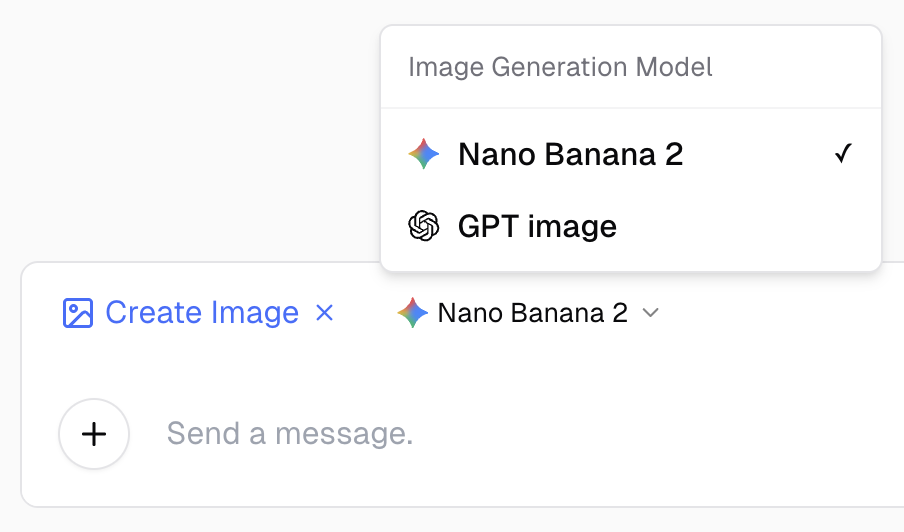
  • Image Generation — GPT Image 2 — Image generation now uses OpenAI's latest GPT Image 2 model, with updated labels and provider badges on generated images.

Image Generation Model Selector

Improvements

  • Session Chat Breakout Rooms — Smoother student assignment experience with drag-and-drop batching, clearer visual states for selected and hovered rooms, and pending-state indicators while saves are in progress.
  • Session Chat Breakout Rooms — Room entry is now more reliable, with snapshots refreshing after joins and reconciling the latest authorized room state.
  • Personalized Challenge — A docs link icon now appears beside the Personalized Challenge setting in the quiz form for quick reference.

Personalized Challenge and Quiz Print Preview

New Features

  • Personalized Challenge — After completing an In-Class Quiz, students can now take an optional Personalized Challenge that generates follow-up practice questions based on their weak areas. Teachers can enable it per quiz and track each student's challenge progress and scores.

Improvements

  • Quiz Print Preview — Teachers and students can preview quiz attempts before printing, with clearer error messages when PDF export fails.
  • Personalized Challenge Results — The dedicated quiz result page batch-loads challenge summaries with loading indicators for a smoother experience.
  • Dedicated Quiz Login Prompt — Signed-out users visiting a dedicated quiz link now see a prompt to log in and link the quiz to their account.

Word Export, HTML Builder, and Quiz Fixes

New Features

  • HTML Game & Website Builder — A new prompt template guides you through building self-contained HTML games and websites with inline CSS and JavaScript, ready to publish to the Site Gallery.
  • Word Export with Math Support — Chat messages can now be exported to Word documents with properly rendered math equations.
  • Time-Aware AI — The AI can now check the current time in your timezone, making it more helpful for scheduling and time-related questions.

Improvements

  • Code Block Streaming — Long code responses now stream with collapsed blocks and a tail preview, keeping the chat responsive while code is being generated.
  • Quiz Generation Quality — In-Class Quiz generation now produces more varied question sets when generating multiple sets at once.

Bug Fixes

  • Fixed In-Class Quiz grading that could hang indefinitely — attempts now move to "Grading Failed" after a timeout, and retrying immediately updates the status.
  • Fixed expired quizzes not appearing in the teacher portal's inactive tab.
  • Fixed image-based quiz generation failing when using image uploads as source material.

Documentation Links

Improvements

  • Class Sessions — Documentation Links — Teachers now see a help icon next to Class Sessions that links directly to the relevant documentation, including on session creation and breakout room dialogs.
  • Event Announcements — Paid members now see the event meeting link directly in the announcement banner instead of the "paid members only" lock message.

In-Class Quiz Custom Fields & Rendering Fixes

New Features

  • In-Class Quiz — Custom Student Information Fields — Teachers can configure custom text or dropdown fields (e.g., student name, class number) that students fill out before starting a quiz. Values appear in the teacher results table and are included in the grade export. Learn more

Improvements

  • Event Announcements — Updated monthly event schedule for April 2026, with support for paid/member-only event indicators.

Bug Fixes

  • Fixed nested mixed list rendering (e.g., bullet list inside numbered list) that caused incorrect formatting in AI chat responses.

Session Chat Breakout Rooms

New Features

  • Session Chat — Breakout Rooms — Teachers can now create named group chat rooms within a Live Session, manually or automatically assign students to rooms (with a configurable max students per group), and students' room selections are preserved on page refresh. Learn more

In-Class Quiz Question Cards View

New Features

  • In-Class Quiz — Question Cards — Teachers can now switch to a "Question Cards" view when reviewing quiz results, browsing student answers question by question with score, answer preview, and inline image thumbnails. Clicking a card opens the result detail at that specific question.

Meeting Summarizer Find & Replace

New Features

  • Meeting Summarizer — Find & Replace — You can now use Find & Replace across meeting summary sections to quickly correct recurring terms or phrases in bulk, making it easier to clean up and refine your summaries after generation.

CE Helper Quotas and LINE Bot Improvements

New Features

  • CE Helper Monthly Usage Limits — LINE Bot users can now see their monthly message and image generation quotas, with real-time usage status displayed directly in the chat.
  • CE Helper Image Generation — Users can generate images directly from the LINE Bot rich menu.

Improvements

  • CE Assistant in Feature Comparison — CE Assistant (LINE Bot) now appears in the subscription feature comparison dialog so users can easily discover it.
  • Class Session Sharing — Simplified the "Copy all info" action by removing the QR code, keeping only the join link and session details for a cleaner sharing experience.
  • In-Class Quiz — Updated quiz link copy and localization across the teacher portal for clearer student-facing instructions.

Bug Fixes

  • Fixed an incorrect LINE Bot URL in the feature comparison dialog and LINE Bot banner.

CE Notify and Session Sharing

New Features

  • CE Notify — A new notification API that lets external services push messages to LINE users, with support for Markdown formatting and usage quota tracking.
  • Class Session Sharing — Copy session details (join link, QR code, expiration) directly from the teacher portal with a new share menu on each session card.

Improvements

  • In-Class Quiz QR Code — QR code downloads now include the quiz title and due date embedded in the image for easier identification.
  • LINE Bot — Migrated to a new bot account (@cebot) with automatic schedule migration for existing users.

Pinned Chats and Quiz Reliability

New Features

  • Pinned Chats — Pin important conversations to the top of the sidebar. Pinned chats appear in a dedicated section with drag-and-drop support for reordering, and work inside folders too. Pin state is preserved when exporting and importing chat history.

Improvements

  • LINE Bot — Returning users no longer need to re-verify their email when re-following the bot.
  • LINE Bot — Reduced notification clutter by throttling progress messages during long-running tasks.
  • LINE Bot — Improved reliability of the bot's long-term memory system and error recovery.
  • LINE Bot — Added a LINE Bot announcement on the home page for better discoverability.

Bug Fixes

  • Fixed In-Class Quiz generation conflicts when opening multiple tabs simultaneously.
  • Fixed In-Class Quiz grading integrity issues that could cause score discrepancies.
  • Fixed LINE Bot tool call ordering that could cause bot responses to fail.

LINE Bot Upgrades and Chat Input Fix

New Features

  • LINE Bot Shortcuts — Access a curated library of shortcuts for common tasks directly in LINE, making it faster to use frequently needed features.
  • LINE Bot Quick Replies — Interactive quick reply buttons now appear after bot responses, guiding you to relevant follow-up actions.
  • LINE Bot Rich Menu — A visual menu bar at the bottom of the LINE chat provides easy one-tap access to key features.

Improvements

  • LINE Bot — The bot can now process images you send for image editing tasks.
  • LINE Bot — Improved help menu with a branded visual card showing available features and actions.
  • Chat History — Active LINE Bot conversations are now hidden from the sidebar chat history and search to reduce clutter.

DM Bot, Organization Usage, and Quiz Fixes

New Features

  • DM Bot (LINE) — Chat with an AI-powered bot directly through LINE, with support for voice messages, file attachments, long-term memory, and scheduled tasks (limited Beta).
  • Organization Usage — The usage analytics page is now available to all organizations, giving admins visibility into their team's AI usage.

Improvements

  • AI response quality — The system now automatically detects and corrects invalid URLs in AI responses, reducing hallucinated links.
  • File downloads — Downloads now work reliably inside the installed app (PWA) without navigating away.
  • In-Class Quiz — Simplified the grading feedback label for a cleaner interface.

Bug Fixes

  • Fixed an issue where the In-Class Quiz landing page could get stuck on a loading spinner after a server error.
  • Fixed quiz page height jumps and layout shifts on the quiz landing page.
  • Fixed quiz success page content being cut off on smaller screens.

Chat History and Quiz Grading Updates

New Features

  • In-Class Quiz — Teachers can now edit individual question grades and feedback directly from the quiz results view, with scores updating instantly.

Improvements

  • Chat history — The sidebar now loads chat history more smoothly as you scroll, making it easier to browse longer conversation lists.

Bug Fixes

  • Fixed an issue that could stop the sidebar from loading more chat history after you reached the bottom.

MQTT Connection Management Improvements

Improvements

  • MQTT — Connections can now be duplicated with one click, and the connection list displays topic and host information for easier identification.

Organization Portal Usage Statistics

New Features

  • Organization Portal — Admins can now open a new Usage Statistics tab to view organization activity trends, active usage, and a breakdown of feature usage based on PostHog data.

Unsplash Image Search & CE Bot Improvements

New Features

  • Unsplash Image Search — AI can now search for and display high-quality photos from Unsplash directly in chat.

Improvements

  • CE Bot — Improved reliability when working with CJK languages and generating PDF reports.

Quiz Radar Chart, Event Announcements & More

New Features

  • Event Announcements — A new notification pill on the home page highlights upcoming workshops. Tap it to see full event details including dates, speakers, and meeting links. The pill automatically hides once all events have passed.
  • In-Class Quiz Performance Radar Chart — Quiz summaries now include an AI-scored radar chart showing class performance across five dimensions: Conceptual Understanding, Accuracy, Completeness, Critical Thinking, and Class Consistency. The chart is also included in Word exports.

Improvements

  • Prompt Templates — Education level options in homepage prompt templates now default to University and are ordered from highest to lowest level for easier selection.
  • Organization Portal — The Organization Portal now appears at the top of the feature menu in its own Management section, making it easier for admins to access.
  • Organization Usage Statistics — Usage statistics in the Organization Portal are now available in alpha.

Prompt Templates Quality Improvements

Improvements

  • Prompt templates — Attachment cards now show uploaded filenames, so you can quickly confirm the right file before running a prompt.

Bug Fixes

  • Fixed a legacy variable-options issue in Prompt templates that could create empty dropdown entries and unstable variable behavior.
  • Fixed $ pattern handling in Prompt templates so variable replacements keep the intended text format.

CE Bot Improvements

Improvements

  • CE Bot — Sessions now restore from their previous state, so files and context created in an earlier CE Bot session are available when you continue later.
  • CE Bot — Startup now shows distinct progress steps (preparing environment → uploading files → starting analysis) instead of a single waiting message.

Bug Fixes

  • Fixed CE Bot getting stuck when its analysis budget runs out — it now exits gracefully and returns partial results instead of deadlocking.

Organization Portal Scrolling Fix

Bug Fixes

  • Fixed page scrolling in the Organization Portal, AI Usage Portal, and District Portal — admins can now scroll through content on these pages as expected.

Prompt Templates and CE Bot Improvements

Improvements

  • Prompt Templates — Revamped the hero dialog with a new "All" tab, streamlined categories, popular templates with education presets, and tooltips for easier discovery.
  • CE Bot — CE Bot can now reference prior conversation context when generating files, and produces better formatted Word documents with proper headings, bold text, and CJK fonts.

Bug Fixes

  • Fixed multi-line text rendering and LaTeX formula display edge cases in chat messages.

Nano Banana 2 🍌🍌

Improvements

  • Nano Banana 2 — Upgraded to the latest image model with improved image quality, sharper details, richer textures, better text rendering, and web search grounding for more accurate subjects. Nano Banana 2 is now the default image generation model and out of beta.

In-Class Quiz Improvements

Improvements

  • In-Class Quiz — Teachers can now view quiz results grouped by student, showing only the latest attempt per student by default. A toggle is available to switch back to viewing all attempts.

CE Bot and Bug Fixes

New Features

  • CE Bot — A new autonomous data-analysis bot that can write and execute Python code, create charts, search the web, and generate files including PPTX presentations — all within the chat interface.

Improvements

  • Changelog — The changelog page now supports pagination for easier browsing of past updates.

Bug Fixes

  • Fixed Site Gallery embedded sites not filling the full viewport height.
  • Fixed Session Chat input staying disabled when the chatroom was properly configured.

Hold Grades and Speaker Name Editing

New Features

  • Hold Grades for In-Class Quiz — Teachers can now hold quiz grades until they are ready to release them. When enabled, students see a submission confirmation without any scores or feedback. Teachers can review results and release grades with a single click.
  • Inline Speaker Name Editing — In Meeting Summarizer transcripts, you can now click on any speaker name to rename it. The change applies to all instances of that speaker throughout the transcript.
  • Changelog Page — A new dedicated changelog page is now available, making it easy to browse all product updates in one place.

Real-Time Session Chat and New Editing Tools

New Features

  • Session Chat — Teachers and students can now chat in real-time during live class sessions, with file sharing, typing indicators, online presence count, teacher badges, and chat history accessible after the session ends.
  • PDF Slide Editor — A new tool for editing text in presentation slides exported as PDFs, powered by OCR text extraction with multi-page support.
  • Quiz Resume for Dedicated Quizzes — Students can resume in-progress quiz attempts on dedicated quizzes, picking up where they left off.
  • Mindmap PNG Download — Mindmaps can now be downloaded as PNG images alongside existing HTML and Markdown options.

Improvements

  • PDF Slide Editor — Automatically runs text detection on uploaded PDFs and improved line-level text detection for more accurate editing.
  • Session Chat — "Send to Chatroom" button lets users forward AI chat messages to the session chatroom. Long messages are collapsible, and a copy button is available on chat message bubbles.
  • PPT Generator — Improved Markdown to PPTX conversion with better nested list handling.

Bug Fixes

  • Fixed In-Class Quiz average correctness calculation to only count graded attempts instead of all attempts.

Teacher Feedback for In-Class Quiz

New Features

  • Teacher Feedback for In-Class Quiz — Teachers can now add written comments and attach files as feedback on individual student quiz attempts. Feedback appears in student results, printed PDF reports, and Excel exports. Teachers can also bulk-download student-uploaded attachments as ZIP files.

Improvements

  • In-Class Quiz — Student-uploaded images and question images now open in a full lightbox with zoom, pan, and download.

Meeting Summarizer Upgrades & Chat History Export

New Features

  • Chat History Export — Users can now export their full chat history.

Improvements

  • Meeting Summarizer — Transcription engine has been upgraded for improved quality. Maximum upload file size increased to 5GB for premium users. Free transcription duration limit doubled from 1 hour to 2 hours.
  • Site Gallery — Downloads now work within published site previews. Redesigned with a floating header for a cleaner browsing experience.

Bug Fixes

  • Fixed Python code runner not correctly detecting multiple files created from a single execution.

Site Gallery Launch & Session Improvements

New Features

  • Site Gallery — A new feature where users can browse, share, and create HTML web creations, with secure domain isolation for JavaScript execution and CDN-powered thumbnails.

Improvements

  • Class Sessions — Maximum session duration has been extended.
  • Subscription Management — Subscription status is now shown in the paid plan dialog.

Bug Fixes

  • Fixed prompt template dialog flickering and reopening unexpectedly.

Multi-Image Quiz Uploads & Word File Support

New Features

  • Multi-Image Quiz Answer Upload — Students can now attach up to 5 images per answer in In-Class Quiz, expanding from the previous single-image limit.
  • Word File Support for Quiz Generation — Teachers can now upload Word documents (.docx) to generate In-Class Quiz questions.

Improvements

  • Teacher Portal — Improved class session reliability and polling stability.

Bug Fixes

  • Fixed teacher portal student chat dialog closing unexpectedly.
  • Fixed expired sessions not showing all participant accounts.

Mobile App Support & Chat Safety

New Features

  • Meeting Summarizer on Mobile — Meeting Summarizer is now accessible from the mobile app, including uploads, transcription, and push notifications.

Improvements

  • Chat Suggestions — AI-powered suggestions now avoid leaking answers when the assistant is asking quiz or riddle questions, preserving the learning experience.
  • Meeting Summarizer — Improved status updates during transcription processing.

Bug Fixes

  • Fixed In-Class Quiz grading to properly respect teacher-provided reference answers.

Organization Reservations & Session Scheduling

New Features

  • Organization Reservations — Organizations can now schedule reservations that temporarily upgrade user roles for a set period. Includes a calendar view, list with filters, and create/cancel flows. A header indicator shows active reservations with role and countdown. This feature can be enabled for your organization by request.
  • Session Scheduling — Teachers can now schedule expired class sessions to restart at a future time while keeping the same session code, quizzes, tags, and chat history. Scheduled sessions show a countdown and can be started early or cancelled.
  • Privacy Notice Page — A new Privacy Notice page is accessible from the sidebar, with bilingual content (English and Traditional Chinese).

Improvements

  • Prompt Templates — Prompt templates are now visible for temporary student accounts.
  • Session Code Input — Now uses an alphanumeric keyboard on mobile devices for easier entry.

Quiz Answer Highlighting & Teaching Outline Generator

New Features

  • Color-Coded Quiz Answer Highlighting — Quiz results now show correct answers in green and incorrect answers in red, making it easy to review. Students also receive an alert before submission listing any unanswered questions.
  • Teaching Outline Generator — A new prompt template for generating lesson plans is now available.

Improvements

  • Chat Messages — Links in chat messages now open in a new tab.

Bug Fixes

  • Fixed chat file generation issues.
  • Fixed signed-in users unable to view anonymous quiz results.
  • Fixed infinite loading on the quiz success page.

Whiteboard Drawing & Teacher Portal Improvements

New Features

  • Whiteboard Drawing — A new drawing tool in the chat input lets users create sketches and attach them as images to messages. Includes color picker, stroke width options, pen/eraser tools, and undo/redo.
  • HTML Hosting — HTML site hosting is now available for all signed-in users.

Improvements

  • Organization Portal — Improved user management with role change confirmation.
  • Teacher Portal — Student list now supports sorting.
  • Chat Messages — Tables now display at full width.

Bug Fixes

  • Fixed mindmap displaying blank after saving edits.

Live Voice Chat & Session Scheduling

New Features

  • Live Voice Chat — Real-time voice conversations with AI, featuring waveform visualization, transcript export, and microphone selection.
  • Session Scheduling — Teachers can now schedule class sessions in advance with overlap detection. Sessions activate automatically at the set time.

Bug Fixes

  • Fixed unable to paste text in Pronunciation Practicer.
  • Fixed dark mode not applying to Meeting Summarizer search bar.

Meeting Summarizer Search

New Features

  • Meeting Summarizer Search — Search across all meeting transcriptions with fuzzy matching, real-time results, match highlighting, and context snippets.

Improvements

  • Class Sessions — Improved session code display and generation.
  • Organization Portal — Simplified the organization settings by removing the pronunciation practicer toggle.
  • Contact Us — Region selection is now available on the contact form.

Template Dropdown Variables & Session Code Redesign

New Features

  • Prompt Template Dropdown Variables — Teachers can now define dropdown options for template variables, allowing students to select from predefined values or optionally enter custom input.
  • QR Code for In-Class Quiz — Dedicated quiz links now display a QR code for easy sharing and scanning.
  • Session Restart with Preserved Codes — Teachers can restart expired class sessions while keeping the original session code. Codes are now alphanumeric with an OTP-style input for easier entry.

Improvements

  • Teacher Portal — Linked quizzes and pronunciation assignments are now sorted alphabetically.

Bug Fixes

  • Fixed prompt template variable inputs being interrupted during IME composition (e.g., typing Chinese).

Quiz Question Reordering & Word Export

New Features

  • Quiz Question Reordering — Teachers can now drag and drop to reorder questions in In-Class Quiz. The order is consistently shown across teacher and student views.
  • Quiz Summary Word Export — Teachers can now download student quiz summaries as Word documents for offline sharing.

Improvements

  • In-Class Quiz — Various improvements including quiz generation progress timer, display name dialog, and status tag refinements.

Bug Fixes

  • Fixed code blocks not displaying correctly in the chat editor.
  • Fixed responsive table layout issues in the editor.
  • Fixed nested lists not being shown properly and markdown formatting missing.
  • Fixed teacher prompt template listing not showing imported templates.

Lexical Editor & Focus Mode

New Features

  • Focus Mode — A new distraction-free mode that expands the chat area by hiding the sidebar and header.
  • Unified Markdown Editor — Chat, quiz, and transcription views now use a unified Lexical-powered markdown editor with improved code blocks and equation rendering.

Improvements

  • Image Generation — Upgraded to a faster image generation model for quicker results.

Bug Fixes

  • Fixed mindmap in Meeting Summarizer being incorrectly limited by the free user rate limiter.
  • Fixed quiz question generation from uploaded files failing in some cases.

Pricing

Choose the plan that fits your work

Start free, then upgrade when you need more capacity and advanced tools.

Free

For everyday questions and lighter use.

Free
  • Everyday AI chat
  • Free allowances for web search and file tools
  • 120 LINE assistant replies each month
Start free

Pro

For people who use Chat Everywhere throughout the week.

$12/ month

3-day free trial

  • GPT-5.1 responses
  • Higher chat and tool limits
  • Web search, file analysis, and productivity tools
  • 120 LINE assistant replies each month
Start a free trial

Ultra

Most capable

For complete AI workflows and demanding daily use.

$32/ month

3-day free trial

  • Everything in Pro
  • Realtime voice conversations
  • Image generation and advanced problem solving
  • 600 LINE replies and 50 images each month
  • Paid Meeting Summarizer features
Start a free trial

Need something more specific?

Meeting-first, teaching, and organization-wide workflows have their own options.

Features and usage allowances may change. The final plan details shown in the app apply at checkout. Tax is added when an invoice is required; contact JoyLearn on LINE at @joylearn.